

Forming defect
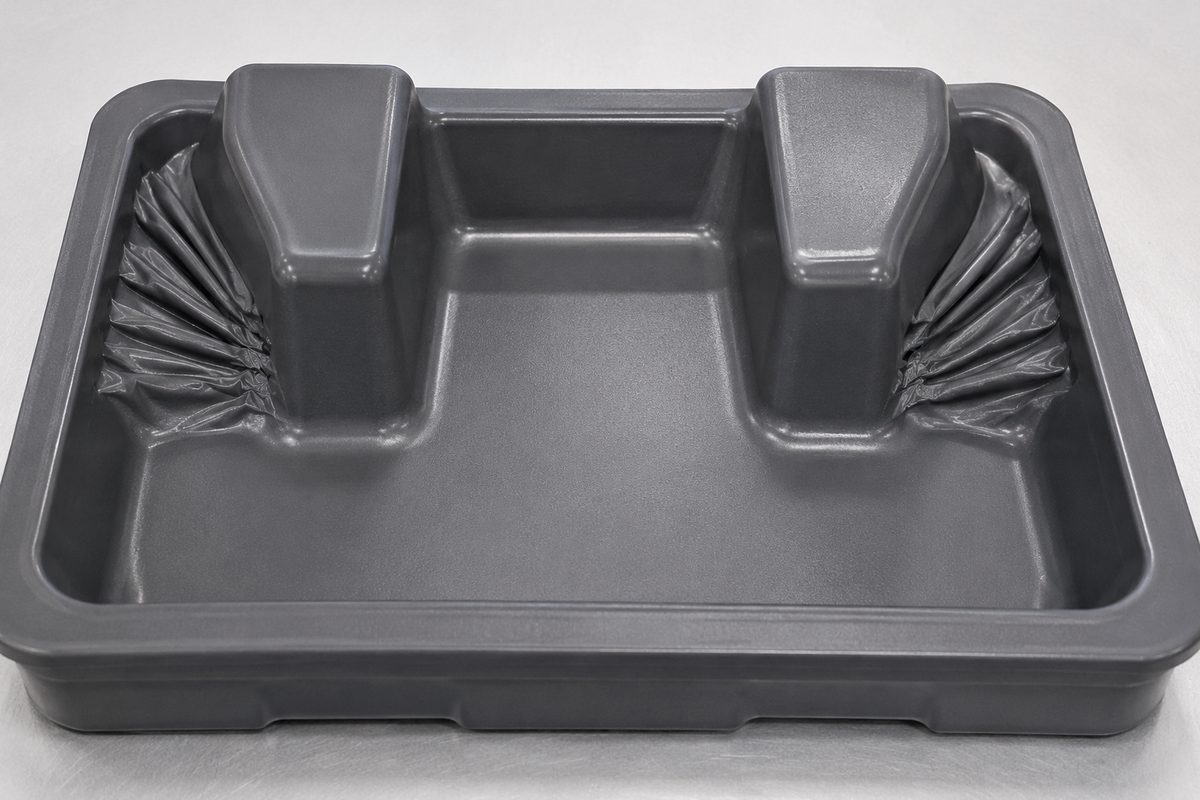
Webbing in thermoforming
Also called: Webs, pleats, folds
Webbing appears when there is more sheet in an area than the tool can draw down smoothly — the surplus material folds over on itself into webs or pleats, usually at corners, between adjacent tall features, or around projections.
Why it happens
- Too much material gathering in one area of the draw
- Tall features spaced too closely together
- Sheet heated hotter than needed, so it drapes and folds
- No plug assist or web catcher to control material distribution
How to fix & prevent it
- Add web catchers or moveable assists to take up slack material
- Space parts and features further apart on the tool
- Use a plug assist to pre-distribute material before vacuum
- Fine-tune zoned heating so the sheet is not over-soft
- Increase draft angles and corner radii in the part design
How Indu prevents it: We flag web-prone geometry at the DFM stage — before any tooling is cut — and design in web catchers, plug assists and part spacing, then tune our zoned heaters in-house so material draws evenly.
Troubleshooting help
Fighting webbing on a part?
Send your drawing, sample or a photo of the issue — our engineers will diagnose the cause and reply with the tooling, material and process fix, usually within 24 hours.
ISO 9001:2015 certified · Most quotes back within 24 hours